Introducing Our Redesigned Booking Flow: Cleaner, More Spacious, More Professional
 Lil Regie Team
.png)
We're thrilled to announce the launch of our completely redesigned booking flow! This has been a labor of love, and we can't wait for you to experience all the improvements we've made to create a more intuitive, professional, and user-friendly event ticketing experience.
The Biggest Change: A Two-Page Structure
The most significant update is our move from a single-page layout to a two-page structure. Instead of cramming all your event information and ticketing options onto one crowded page, we've separated them into two dedicated spaces:
Page 1: Event Details Page - Everything about your event, beautifully presented
Page 2: Ticket Selection Page - A focused, streamlined ticketing experience
This separation is particularly valuable for events with complex setups, whether you have numerous custom entry fields, multiple eventlets, or eventlets with detailed descriptions. By giving each section its own page, we've eliminated the overwhelming feeling of information overload and created a clearer user journey.
Event Details Page: Let Your Event Shine
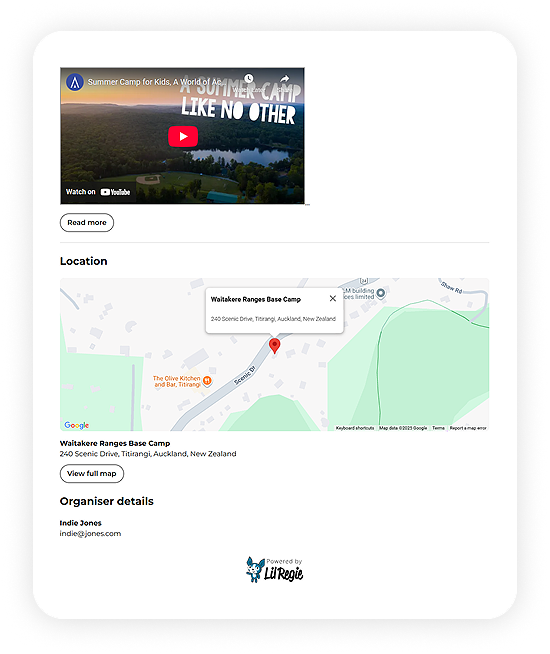
With a full page dedicated to event information, you now have significantly more space to tell your event's story. You can embed videos, add rich media content, and provide much more detail than was possible in the old layout where space was limited.
We've also significantly improved how location information is displayed. Your venue now features a beautiful embedded map directly on the page, creating a much more professional and visually appealing presentation.
Dedicated Space for Your Event Organiser Logo
No more compromising your banner design to fit in your logo! We've added a dedicated upload field specifically for your event organiser logo. It displays independently from your banner image, giving you cleaner brand presentation and more flexibility in your visual design.
Choose Your Banner Style: Fixed or Fluid
In the modern layout, you can select between two banner display options:
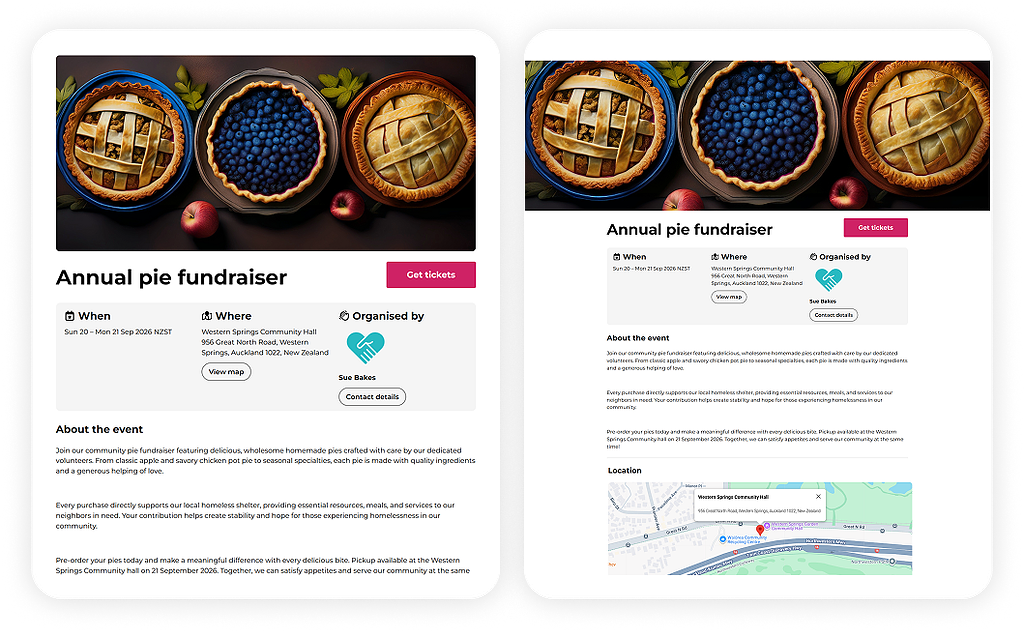
Fixed Width Banner - Maintains your banner's original dimensions across all screen sizes with no cropping. This is ideal when you've incorporated logos, text, or specific branding elements into your banner that need to remain fully visible.
Fluid Design (Full-Width) - Scales to fill the entire width of the screen, with some cropping on different devices. This works beautifully for supplementary images like crowd shots, landscapes, or abstract backgrounds where edge cropping won't affect the overall impact.
Ticket Selection Page: Focus on What Matters
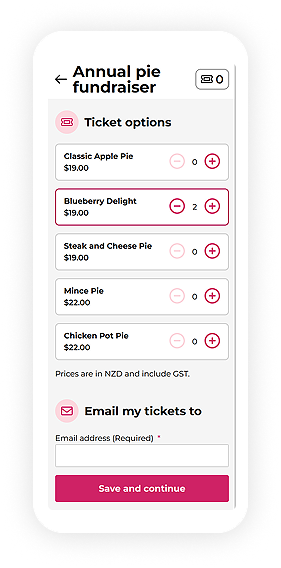
When attendees click "Get Tickets," they're taken to a dedicated ticketing page focused entirely on helping them choose and purchase tickets. This is especially beneficial for events with elaborate ticket structures. Instead of competing with event details for attention, your ticketing options get the space and clarity they deserve.
.png)
Cleaner Eventlet Presentation
We've redesigned how eventlet information is displayed. Eventlet descriptions are now visually separated from the event name, date, time, and price, creating a clear hierarchy that makes it easier for attendees to scan and understand their options. The result is a more readable, professional appearance that helps drive conversions.
Mobile Experience: Designed Mobile-First
We've designed the new booking flow with mobile users in mind from the ground up. The entire interface is intuitive, touch-friendly, and maintains that clean, professional appearance across all screen sizes. Whether your attendees are browsing on desktop, tablet, or smartphone, they'll enjoy a seamless, responsive experience.
Enhanced Form Field Interactions
We've added visual hover states to all input fields throughout the booking flow. When you hover over a field, the border changes from gray to pink, providing a clear visual indicator of which field you're about to interact with. This subtle enhancement makes the form completion process more intuitive and user-friendly.
Coming Soon
We're not stopping here. We have two exciting features in development that will make your event management even more efficient and user friendly.
Related Events Section
In the near future, we'll be adding a related events section at the bottom of the event details page. Event organisers will be able to showcase other events they're running, creating valuable cross-promotion opportunities and helping attendees discover more of your events.
Per-Booking Information Fields
We're also introducing a feature that will significantly streamline the booking process for events with multiple attendees. Event organisers will be able to designate specific entry fields to be filled out once per booking rather than once per attendee.
This is particularly valuable for events where attendees need to complete extensive custom fields that may be identical for a group, such as parent/guardian details, emergency contacts, or team names. Instead of repetitive data entry, bookers will only provide this information once for the entire booking, reducing form fatigue and speeding up the registration process.
The Bottom Line: Cleaner, More Spacious, More Professional
The essence of this redesign comes down to giving your content room to breathe. The new layout is cleaner and less cramped. All your event information is visible and easy to read. The embedded map creates a stunning visual impact. And the entire user journey, from learning about an event to purchasing tickets, flows naturally and intuitively.
Whether you're an event organiser trying to showcase your event or an attendee looking to register, the new booking flow delivers a superior experience at every touchpoint.
Transition Period: Legacy and Modern Layouts
We understand that change takes time, especially if you have events already set up. We're providing a transition period during which you can choose between the Legacy Layout and the new Modern Layout. The legacy option ensures we won't disrupt your existing events, giving you time to explore the new design and migrate at your own pace.
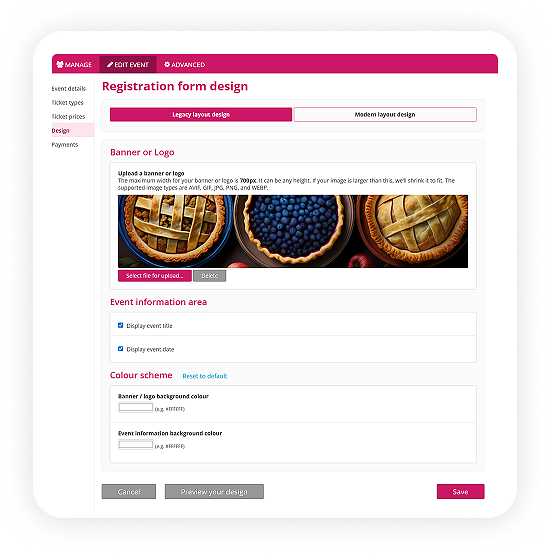
After the transition period, we will phase out the legacy layout entirely. We encourage you to explore the modern layout and experience all these improvements firsthand so you're ready for the transition.
Ready to Experience the New Booking Flow?
We're incredibly excited about these changes and can't wait for you to see the difference they make. The new booking flow represents our commitment to providing you with the best possible event ticketing platform. It's beautiful, functional, and puts your events in the best possible light.
Check out the new design today and let us know what you think. We're always listening and continuously working to make your event management experience even better.
Have questions about the new booking flow? Reach out to our support team. We're here to help!